Facebook Marketplace vs OfferUp


For most local sales, facebook marketplace vs offerup comes down to reach: Facebook Marketplace usually gives you more nearby buyers, while OfferUp can be easier for focused local listings. Use Facebook Marketplace for common household goods and OfferUp when you want a simpler selling app with strong local intent. If you need shipping, buyer protection, or a formal checkout process, neither local option is the best fit; use a platform built for shipped sales instead.
Facebook Marketplace vs OfferUp: key differences
Facebook Marketplace and OfferUp both help you sell items locally, but they suit different selling habits. Facebook usually benefits from a larger social network, while OfferUp keeps the buying and selling experience more focused.
| Method | How long | Effort | Cost | Best for |
|---|---|---|---|---|
| Facebook Marketplace | Fast for common items | Low | Low | Local reach and quick messages |
| OfferUp | Fast for popular local items | Low | Low | Focused listings and local pickup |
| Craigslist | Varies by item and city | Medium | Low | Large items and direct contact |
| eBay | Longer when shipping is involved | High | Medium | Collectibles and shipped orders |
Facebook Marketplace works well when you want your listing seen by people already using Facebook. You can also share a listing with local groups, where those group rules allow it. The trade-off is that messages may become scattered across Facebook, and serious buyers can be mixed with weak inquiries.
OfferUp is more focused on buying and selling. Its interface can feel less crowded, which helps when you want to browse similar items or manage local chats. However, the buyer pool may be smaller in your area, so some listings can take longer to get attention.
Craigslist remains useful for furniture, appliances, vehicles, and other bulky goods. It can bring direct responses without a social profile, but the experience has fewer built-in tools for organizing conversations.
eBay makes more sense when the item has buyers outside your city. You’ll need to handle packing, shipping, returns, and platform rules, so the wider audience comes with more work.
Selling on Facebook Marketplace
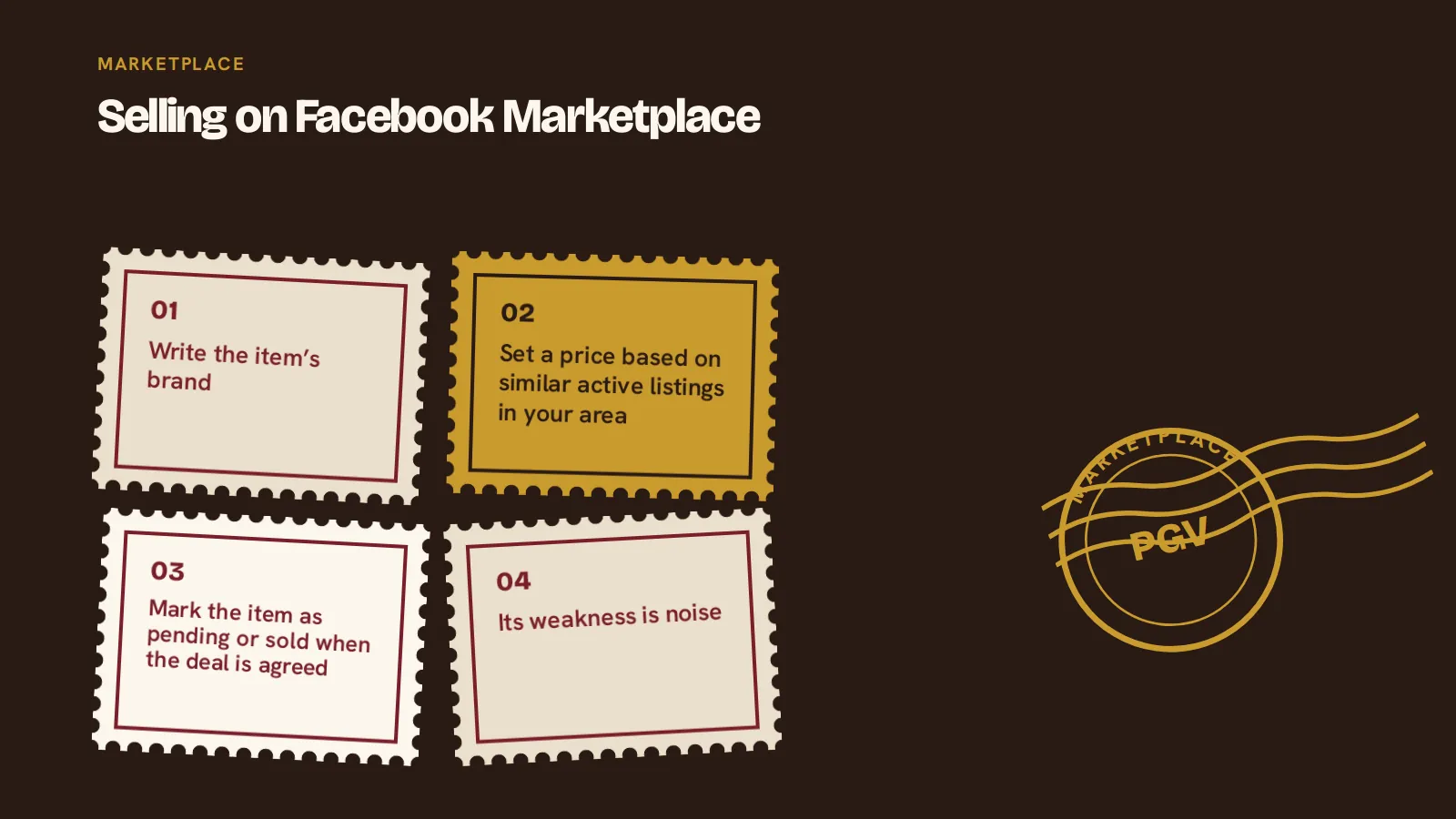
Facebook Marketplace is usually the strongest first choice for ordinary items that buyers can collect nearby. Its main advantage is visibility, especially when your local area has active Facebook users and groups.
- Open Marketplace and choose the option to create a new listing. Select the correct item category, then add clear photos from several angles.
- Write the item’s brand, model, condition, size, and defects in the title or description. State the pickup area and whether the price is firm.
- Set a price based on similar active listings in your area. If comparable items are barely used, a damaged or incomplete item should be priced lower.
- Reply inside Messenger and confirm the meeting plan before leaving home. If the buyer changes the plan repeatedly, stop arranging the sale.
- Mark the item as pending or sold when the deal is agreed. Remove the listing after payment and pickup are complete.
This method is good for furniture, kitchen items, clothing bundles, electronics, and children’s goods. It’s also useful when you can share the listing with a relevant local group.
Its weakness is noise. You may receive “Is this available?” Messages that don’t lead to a sale, and your listing can disappear quickly when newer posts arrive.
Don’t share passwords, verification codes, or bank login details. The Federal Trade Commission explains common warning signs in its online shopping scam guidance. If someone asks you to pay a fee to receive money, stop the conversation.
Facebook Marketplace isn’t for sellers who want a fully managed shipping, payment, and return system. For those sales, use a platform designed for shipped orders and read its current seller rules before listing.
Facebook Marketplace rules to check first
Marketplace listings must follow Meta’s Commerce Policies. These are not a separate Marketplace-only rulebook. They cover any attempt to buy, sell or trade products, even for free. They apply across Facebook, Instagram, WhatsApp and Messenger.
- Marketplace is intended for consumer-to-consumer sales. Businesses, and people selling in a business capacity, can face restrictions in some regions. Meta names the European Economic Area, the Philippines and India.
- The policies prohibit content that breaks the Community Standards. They also prohibit promoting the sale of alcohol, adult products, human body parts or fluids, and certain subscriptions and digital products.
- Breaking the rules can lead to rejected or removed listings. It can also lead to suspended or terminated access to commerce features. A removed listing does not by itself mean your account is disabled.
- Meta does not publish an exact minimum account age for Marketplace. Access depends on factors such as your location, age and the standing of your account.
Meta’s Marketplace Help Center explains selling locally, selling with delivery, ratings and how to avoid scams.
Selling on OfferUp

OfferUp is a good choice when you want a dedicated local-selling app instead of a broader social network. It can work especially well for furniture, tools, phones, game systems, and other items people prefer to inspect before buying.
- Create a listing with the correct category, a short title, and several recent photos. Put the brand and model in the title when the item has one.
- Describe the condition honestly. Include missing cables, scratches, stains, repairs, measurements, and any feature that doesn’t work.
- Choose local pickup unless you’re certain the item and sale method support shipping. A large item can be difficult to pack or send safely.
- Keep the conversation in the app while you agree on the price, location, and time. Don’t move to a private payment link just because a buyer asks.
- Meet in a public place when practical, or use a safe pickup plan for large goods. Let another person know where you’re going.
OfferUp is strong when buyers search directly for an item and sellers want fewer social distractions. Its local focus can also help you compare nearby prices before you set your own.
The weakness is reach. If your city has fewer active OfferUp users, a listing may get fewer views than the same item on Facebook Marketplace.
This option isn’t for someone who wants to avoid all buyer messages. You’ll still need to answer questions, reject unsafe payment requests, and decide whether a buyer seems reliable.
A common costly mistake is accepting a payment screenshot before confirming the money in your own account. A fake confirmation can leave you without the item and without payment. Don’t hand over the product until the payment is genuinely available and the sale terms are clear.
Selling through Craigslist
Craigslist can be practical for large items that are hard to ship. Buyers often search by city, so a sofa, desk, appliance, or vehicle can reach people who already expect local pickup.
- Open the classified section for your city and choose the category that matches the item. Use a title with the product type, brand, and key size or model detail.
- Add several photos and a full description. Include measurements, working condition, defects, pickup requirements, and whether you’ll help load it.
- Set a realistic asking price by checking similar local listings. If the item must be removed quickly, price it lower than comparable listings.
- Use the platform’s reply process and avoid sharing more personal information than needed. Agree on a public meeting place when the item is small enough to move.
- For large goods, keep the pickup at a time when another person can be present. Don’t let an unknown buyer enter private rooms of your home.
Craigslist is useful when a buyer doesn’t need a social account or app profile. It can also work well for unusual local items that don’t fit neatly into a social feed.
The weakness is that you’ll have fewer built-in tools for sorting chats, checking profiles, or managing a sale. You’ll need to use your own judgment and keep records of the agreed price.
For most small household items, Craigslist is rarely the first method I’d choose today. Facebook Marketplace or OfferUp usually gives you a more convenient listing experience.
Which marketplace should you use?
Your best choice depends on the item, the buyer pool in your area, and how much work you’ll accept. If you want speed, choose the platform with active local listings for the same type of product.
When you’re in a hurry
Choose Facebook Marketplace when you need a common item sold quickly. Its wider local visibility can create more inquiries, especially for furniture, appliances, and low-cost household goods.
The trade-off is message quality. You may get more replies, but you’ll also spend more time filtering buyers who don’t answer clearly or don’t show up.
When you’re selling for the first time
Choose OfferUp when you want a focused app and a simple local listing. Start with one item, use exact photos, and keep all agreement details in the chat.
OfferUp isn’t risk-free, but its purpose is clear: people open it to look for items. That can feel easier than managing a listing inside a larger social platform.
When you want the best possible result
Choose eBay for a valuable, rare, or collectible item with buyers outside your area. Shipping adds packing work, fees, and return concerns, but it can expose the item to a larger market.
If the item is heavy, fragile, or hard to describe, local pickup may still produce the better result. If the item is easy to ship and has a known model or collectible market, the extra work may be worth it.
If speed matters more than price, use the platform with the strongest local activity. If price matters more than convenience, consider a wider marketplace and accept the added work.
Marketplace selling rules that matter
Good photos and accurate details matter on every platform. Wipe the item, use daylight when possible, and show damage instead of hiding it. Include several angles, the brand label, and close-ups of scratches, stains, cracks, or missing parts. A buyer who discovers a defect at pickup may leave, negotiate sharply, or report the listing.
Check the platform’s current rules before listing restricted goods, medications, weapons, animals, recalled products, or financial items. Facebook, OfferUp, Craigslist, and eBay publish different policies, and those policies can change. A listing allowed on one service may be removed on another, so don’t assume that copying an existing listing makes it acceptable.
Prepare the item before you post it. Find the model number, measure large objects, test the main function, gather included accessories, and decide whether you’ll accept offers. State what is included, what is missing, and whether the buyer must pick it up. This prevents a long message chain about facts you could have written once.
Keep communication inside the platform when possible. Check the conversation partway through the sale. If the buyer changes the location, asks for a code, sends an unexpected payment link, or pressures you to act immediately, pause the deal. Never share a one-time login or verification code. If the item is high value, meet at a public exchange area or ask local law enforcement whether it offers a safe-trade location.
At the end, confirm payment in your own account before handing over the item. For cash, count it in a safe place; for electronic payment, open your payment app directly instead of trusting an email or screenshot. Don’t rely on a pending balance, a canceled transfer, or a buyer’s claim that payment is delayed.
The value that varies most is your local buyer activity. Search the same item on Facebook Marketplace and OfferUp in your city, then compare the number of recent listings and completed-looking conversations; that’s a better guide than national advice. If similar items are plentiful, improve the photos and price before reposting.
Our team handles exactly this through Facebook Marketplace Account Setup.
Frequently asked questions
Is Facebook Marketplace safer than OfferUp?
No, neither platform is automatically safe for every transaction. Safety depends on the buyer, payment method, meeting place, and item value. Keep messages in the platform, don’t share login codes, and avoid links sent by strangers. Meet in a public location when possible, and tell someone where you’ll be. For a large item, arrange pickup when another adult is present. Trust the plan, not just the profile.
Can you sell the same item on Facebook Marketplace and OfferUp?
Yes, you can usually list the same item on both platforms, as long as each service’s current rules allow the listing. Remove or update the other post as soon as the item sells. Don’t accept two deposits for one item. Write down which buyer contacted you first, and tell other interested people that the item is pending rather than promising it to everyone.
How long does it take to sell on OfferUp?
There’s no honest fixed number of days because local demand, price, condition, and category control the result. A popular item priced near local listings may receive messages quickly, while an unusual or overpriced item can sit much longer. Check similar recent listings in your city. If you get views but no serious messages, improve the photos or lower the price.
What happens if a Facebook Marketplace buyer doesn’t show up?
The item remains yours unless you agreed to a binding sale under local law. Send one clear message asking whether the buyer still plans to come, then set a reasonable cutoff time. Don’t keep waiting without an answer. If the buyer repeatedly misses meetings, stop dealing with them and relist the item. Keep future pickup times specific and avoid holding items without a firm agreement.
Can you use PayPal on OfferUp?
Yes, PayPal may be available in some situations, but you should follow OfferUp’s current payment and shipping instructions rather than accepting an outside request blindly. Never pay a fee to receive money, and don’t trust a payment email alone. Open the payment service yourself and confirm the funds. For local pickup, agree on the payment method before meeting.
Is it safe to give out your phone number on Marketplace?
It’s safer to keep early communication inside Messenger or the selling app. A stranger asking for your phone number may send unwanted messages or try to obtain a verification code. If you do share a number, never provide a code sent to your phone. A real buyer doesn’t need your login code to confirm that you’re a person.
What should you do if a buyer offers more than the asking price?
Pause or decline the deal until you understand why the offer is higher. Overpayments can involve fake payments, stolen accounts, or requests to refund money, so confirm the full payment in your own account before sending anything back. Cancel the sale if the buyer creates pressure or confusion.
What to do next
Choose the app that matches your item and selling style, then create a clear listing with honest photos, a fair price, and a safe pickup plan. Check messages regularly, trust your instincts, and be ready to adjust the price or description if local buyers aren’t responding.

Derek Campbell writes about Facebook features, tools, and account management, covering topics such as account troubleshooting, Business Manager, Facebook Marketplace, and outreach strategies. His content also explores Facebook Groups, community engagement, and ways to connect with relevant audiences. His writing emphasizes practical Facebook know-how, from navigating Marketplace and managing business communities to building meaningful connections through Groups and outreach.
Checked against Facebook’s own help and policy pages on the date shown above.